
Human Design Chart Symbols
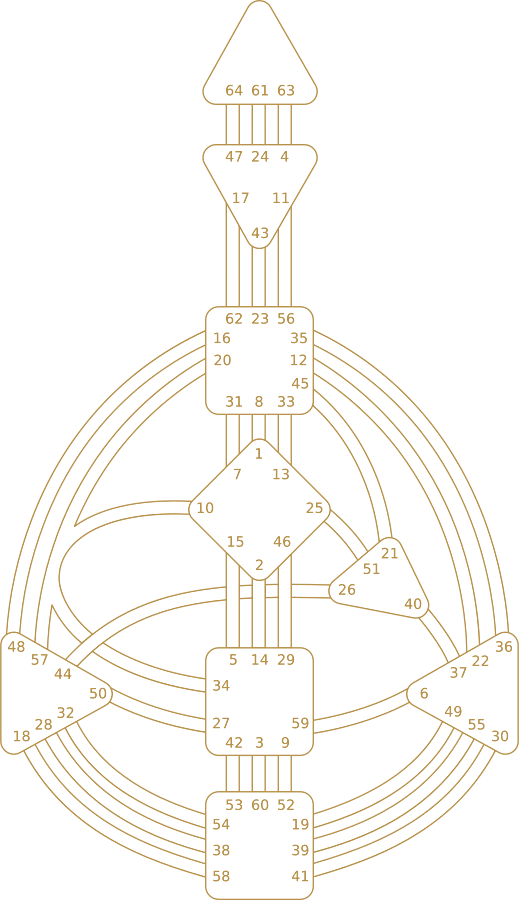
Human Design chart symbols explain what you are looking at when you open your BodyGraph, including the shapes, lines, numbers, colors, arrows, and side-column symbols that make the chart feel confusing at first.
When you understand what each symbol represents, your chart becomes easier to read and much less overwhelming. Instead of guessing what each part means, you can start recognizing the structure behind your design.
On this page, you will learn what the main Human Design chart symbols mean, how to read the visual parts of a BodyGraph, what the colors and numbers show, what the planetary symbols mean, and where to go next for deeper chart interpretation.
Simple way to understand Human Design chart symbols: start with the shapes, then the lines, then the numbers, then the side-column symbols. Once you know what each layer represents, the chart starts to feel much more readable.
What Human Design chart symbols mean
Human Design chart symbols are the visual markers that make up your BodyGraph. They show where your energy is defined, where you are open, which themes are activated, and how different parts of your design connect together.
Most beginners see the chart and notice the shapes, lines, numbers, and arrows, but do not yet know what role each part plays. That is normal. The chart becomes much easier once you stop trying to understand everything at once and focus on one visual layer at a time.
If you want the full chart overview first, go to How to Read Your Human Design Chart. This page is focused on the symbols themselves and what each visual element means.
Shapes show Centers
The 9 shapes in the BodyGraph are the Centers. They show the areas of life where your energy is either consistent or open to conditioning.
Lines show Channels
The lines connecting Centers are Channels. When fully connected and colored, they represent stable energetic themes in your design.
Numbers show Gates
The numbers around the Centers are Gates. Gates represent specific archetypal themes and become more powerful when activated.
Columns show planetary activations
The two side columns list planetary placements that build your chart. They help explain conscious and unconscious parts of your design.
Quick symbol legend for beginners
If you want the fastest beginner breakdown, use this simple legend first. It gives you the basic role of each major symbol group before you go deeper into the chart.
Shapes
The shapes are your Centers. They show major life themes like identity, communication, emotion, instinct, pressure, and life force.
Lines
The lines are Channels. They connect Centers and show consistent energetic pathways when fully defined.
Numbers
The numbers are Gates. They mark specific themes, traits, and archetypal patterns within the chart.
Colors
Colors help show what is defined and consistent versus what is open and receptive to outside conditioning.
Side columns
The side columns are planetary activations. They show which planets are activating which Gates in your chart.
Arrows
The four arrows are the Variables: Determination (also called Digestion), Environment, Motivation, and Perspective.
What people confuse most: shapes are Centers, numbers are Gates, lines are Channels, side columns are planetary activations, and arrows are variable symbols.
Shapes and Centers in the Human Design chart
The shapes in your chart are called Centers. These are one of the first symbol groups to learn because they organize the chart visually and show where different life themes live.
Head Center
Represents inspiration, pressure, and mental questions.
Ajna Center
Represents processing, concepts, and mental certainty.
Throat Center
Represents expression, communication, and manifestation through voice and action.
G Center
Represents identity, love, direction, and your sense of inner orientation.
Ego or Heart Center
Represents willpower, value, commitment, and material drive.
Solar Plexus Center
Represents emotion, sensitivity, and emotional waves.
Sacral Center
Represents life force, workforce energy, and gut response.
Spleen Center
Represents instinct, intuition, health, and survival awareness.
Root Center
Represents pressure, stress, adrenaline, and the drive to begin or move.
Want the full Centers breakdown? Read Human Design Centers.
Lines and Channels in the BodyGraph
The lines connecting two Centers are called Channels. These symbols show where energy moves between parts of your chart and where you have a stable energetic theme when the full channel is defined.
Fully colored line
A fully colored line usually means a complete Channel. This represents a consistent energy pattern in your design.
Partially activated line
A hanging Gate may activate one side of a channel without completing it. This can still be important, but it is not the same as a full Channel.
Channel meaning
Channels describe stable themes like communication, rhythm, charisma, intuition, struggle, or individual expression depending on which Gates connect.
Why Channels matter later
They are powerful, but they make more sense after your Type, Strategy, and Authority are clear.
To go deeper, use Human Design Gates & Channels.
What the numbers mean in a Human Design chart
The numbers in your Human Design chart are called Gates. Each Gate represents a specific theme or archetypal pattern within the chart.
Gates sit around the Centers and become active through planetary placements. When a Gate is activated, it highlights a trait or theme that plays a role in your design.
Gates are specific themes
Every Gate has its own meaning. Some relate to leadership, others to emotion, identity, direction, pressure, logic, intuition, or expression.
Gates can stand alone
An activated Gate still matters even if the full Channel is not defined. It often shows a repeating pattern or sensitivity in your design.
Two Gates can form a Channel
When both ends of a channel are activated, the connection becomes a defined Channel and carries a stronger, more stable expression.
Numbers are not random
The numbers come from the 64 Gates of the Human Design system, which map to the structure of the chart and deeper archetypal themes.
What the chart colors mean
One of the most useful symbol patterns in a BodyGraph is color. The colors help show what is fixed and consistent versus what is open and receptive.
Colored Centers
Colored Centers are usually defined. They show where your energy tends to be consistent and reliable.
White Centers
White Centers are usually undefined or open. They show where you are more sensitive to conditioning and where wisdom can develop through experience.
Colored Channels
Colored Channels represent stable connections between two Centers and often point to consistent themes in how your energy works.
Red and black activations
Black often relates to conscious Personality activations, while red often relates to unconscious Design activations.
For a deeper explanation of colored versus white Centers, read Defined vs Undefined Centers in Human Design.
Design and Personality columns
On the left and right sides of your chart, you will usually see two vertical columns of planetary symbols, Gate numbers, line numbers, colors, tones, and bases. These columns are part of what builds the chart.
Personality column
The Personality side usually represents conscious traits. These are often easier for you to recognize in yourself.
Design column
The Design side usually represents unconscious traits. These may be more visible to other people before they are obvious to you.
Planet symbols
Each row corresponds to a planetary activation. These placements shape the Gates and lines that become part of your chart.
Why this matters
These symbols add depth, but most beginners do not need to master them first. They become more meaningful after your core chart foundation is clear.
If you want to explore that layer more directly, read Human Design Planets Meaning.
Planet symbols in a Human Design chart
One of the most searched parts of Human Design chart symbols is the planetary icons in the side columns. These symbols mark which planet is activating which Gate in your design.
You do not need to memorize every planet first, but it helps to know that each symbol adds a different flavor to the Gate it activates. The Gate shows the theme, and the planet shapes how that theme tends to express itself.
Sun and Earth
These are major anchor points in the chart and often carry some of the strongest core themes in your design.
Moon
The Moon often points to internal drive, movement, and what keeps energy in motion.
North Node and South Node
The Nodes are often connected to life direction, environment, and the larger arc of your path.
Mercury
Mercury is often connected to communication, expression, message, and what you are here to speak or articulate.
Venus
Venus often relates to values, preferences, standards, and what matters to you relationally or aesthetically.
Mars
Mars often points to immature energy, raw development, and themes that grow stronger through experience.
Jupiter
Jupiter is the planet of law and protection: the principles you live by, and what supports you when you live them.
Saturn
Saturn is the planet of discipline, the judge: where life asks for restraint and structure.
Uranus
Uranus often connects to uniqueness, disruption, originality, and the parts of your design that do not follow the expected path.
Neptune
Neptune often relates to mystery, subtlety, hidden influence, and themes that may take time to see clearly.
Pluto
Pluto often points to deep transformation, truth, power, and long-term inner change.
How to use this section
You do not need deep planet meanings to read your chart well at first. This section is mainly here to help you recognize what those symbols are when you see them.
For a deeper breakdown of what each planetary activation means, go to Human Design Planets Meaning.
What the four arrows mean in Human Design
The four arrows near the head of the chart are another symbol group people often notice right away. These arrows point to the four Variables: Determination (how you take things in), Environment, Motivation, and Perspective.
Beginner note: the four arrows are interesting, but they are not where you need to start. Your chart becomes more useful faster when you begin with Type, Strategy, and Authority first.
They are advanced symbols
The arrows are part of the variable system and usually matter more after the core mechanics of your design are already familiar.
They affect how you process life
These symbols stand for Determination (also called Digestion), Environment, Motivation, and Perspective, a later layer than the first one you learn.
How to read Human Design chart symbols in the right order
The easiest way to understand chart symbols is to move from the biggest visual layer to the smallest. That keeps the chart from feeling too technical too early.
Start here
Shapes and Centers first. Learn what the 9 Centers are and whether they are colored or white.
Then look at the lines
Once the Centers make sense, look at the connecting lines to understand which Channels are defined.
Then look at the numbers
After that, learn what the Gate numbers represent and how they connect to the rest of the chart.
Save advanced symbols for later
The columns, arrows, and deeper variables matter, but they make much more sense after the core structure clicks.
If you want the full chart walkthrough next, go to How to Read Your Human Design Chart.
Common mistakes when learning Human Design chart symbols
- Trying to decode everything at once: the chart feels easier when you learn one visual layer at a time
- Starting with advanced symbols first: arrows, variables, and planetary detail make more sense later
- Confusing symbols with interpretation: knowing what a symbol is comes before knowing what it means in your life
- Skipping the core foundation: Type, Strategy, and Authority still matter more than memorizing every visual detail
Quick recap: Human Design chart symbols are the visual building blocks of your BodyGraph. Shapes are Centers. Lines are Channels. Numbers are Gates. Side columns show planetary activations. Colors show what is defined versus open. Arrows are advanced variables. Learn them in that order, and always come back to your Type, Strategy, and Authority as the foundation.
FAQ: Human Design Chart Symbols
What are Human Design chart symbols?
Human Design chart symbols are the visual elements in a BodyGraph, including the Centers, Channels, Gates, colors, arrows, and side-column planetary activations that make up your chart.
What do the shapes mean in a Human Design chart?
The shapes in a Human Design chart are the 9 Centers. They represent major areas of life and show where your energy is defined or open.
What do the numbers mean in a Human Design chart?
The numbers in a Human Design chart are Gates. Each Gate represents a specific theme or trait within the chart and can connect with another Gate to form a Channel.
What do the colors mean in a Human Design chart?
Chart colors usually show what is defined and consistent versus what is undefined or open. Colored Centers and Channels tend to represent stable energy, while white areas tend to show openness and conditioning sensitivity.
What do the planet symbols mean in a Human Design chart?
The planet symbols in a Human Design chart show which planets are activating which Gates. Each planet adds a different emphasis to the Gate it touches and helps shape how that theme expresses in your design.
What do the arrows mean in a Human Design chart?
The four arrows in a Human Design chart are part of the variable system. They name four advanced themes: Determination (also called Digestion), Environment, Motivation, and Perspective.
What is the difference between red and black in a Human Design chart?
Black activations usually represent the conscious Personality side of your chart. Red activations usually represent the unconscious Design side. Both contribute to your full map and together they create the complete BodyGraph.
What page should I read after learning the symbols?
After learning the symbols, the best next step is to read How to Read Your Human Design Chart so you can understand the full chart in the right order.